Saturday, October 31, 2015

The Hottest Posts Everyone's Reading

Here’s the roundup of what's been popular on The Innovative Educator blog.

Holding the lead for another week is a post from my book Teaching Generation Text. This post outlines the building blocks for BYOD success. Next up is an article that shares five free tools for those trying to learn a new language.


Some of the other posts that round out the top include one that looks at 4 edtech tools I discovered at the #TLTechLive event as well as one that looks at using social media to improve events.  I hope there's something that looks of interest to you.  If it does, check it out. If you’re inspired use one of those icons below the post to share it with others and/or leave a comment.

Entry
Pageviews
Oct 11, 2015,
3335
Oct 4, 2015, 
3262
Oct 25, 2015, 
3235
Oct 18, 2015,
2296
Oct 13, 2015, 
2127
Oct 6, 2015, 
1903

Wednesday, October 28, 2015

How Tech Using Teachers Can #HavetheTalk with Administrators

There are several quality free programs available for schools. Part of my work is helping teachers use platforms such as the ones below in the classroom.

Using technology in the classroom is a change from conventional teaching and learning. That's a good thing, but educators face a problem when being evaluated if their administrator does not know how to evaluate a teacher whose students are learning in such an environment. Regardless, teachers must be armed with the knowledge of how to prepare for such evaluations.

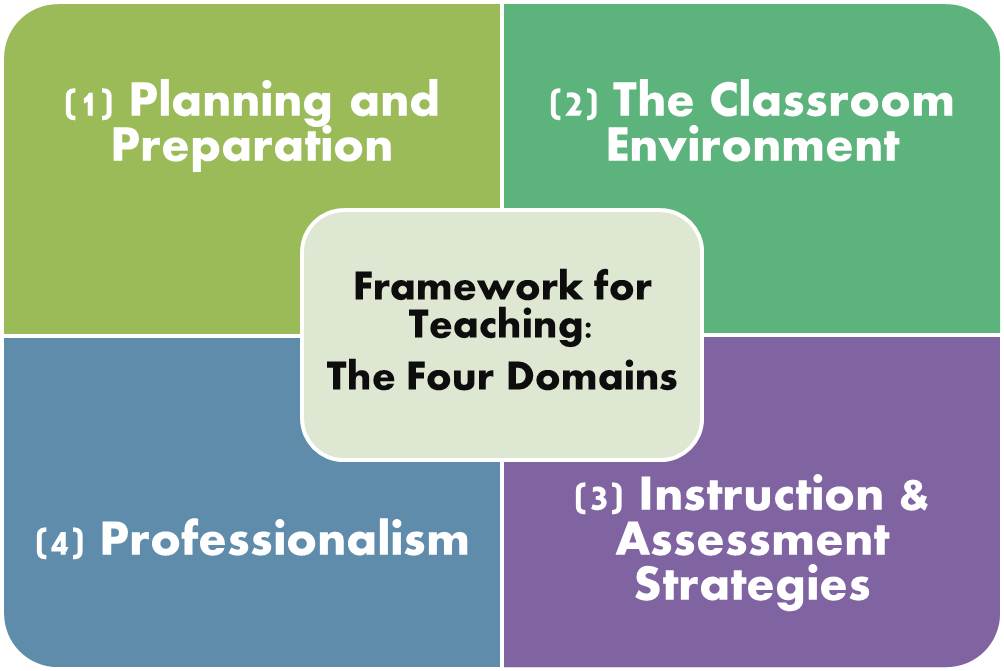
In cities like New York teachers are evaluated using the four Danielson Domains. This means teachers must be prepared to explain to administrators what they are doing through the lens of each of the following Domains.


Image result for danielson framework

Here is what that looks like.
Domain 1: Planning and preparation. When using a quality program, it is planned and prepared well. What this looks like - The programs are delivered using materials developed by world-renowned experts. This means the content is coherently delivered and created by many of the most knowledgeable in the field.
What teachers must be prepared to do – Know who created the program and the research behind it.  Be prepared to discuss the instructional design and elements that make this program a success for student learning.

Domain 2: Classroom Environment What this looks like - Teachers and students are interacting but it doesn’t look like conventional interaction. Additionally, students may be interacting with others around the globe. Innovative educators must know how to explain this.  Students are engaging digitally.

What teachers must be prepared to do - Be ready to explain how you are building and developing responsible digital citizens.  Have examples handy of teacher – student and student – student interactions.  Know how to show student behavior, how it is monitored, and what you do if there are behavior issues.

Domain 3: Instruction What this looks like - When technology is used all students are able to participate all the time in ways never possible in conventional classrooms.  Students are grouped and placed in a way that is instantly assessed based on their ability. Pacing is individualized. Student assessment and feedback is instant.   
What teachers must be prepared to do – Consider putting together a slide deck that outlines some of the elements that support instruction with real student samples. This would include the sort of questions and prompts students receive. The way discussion is fostered. Show a dashboard that captures student participation.  Provide a graph of the class that shows the structure and pacing of students based on individual progress.  Give examples of the type of instant feedback students receive as well as how student can assess and monitor themselves. 
Domain 4: Professional Responsibilities One of the wonderful attributes on online platforms is that they have professional learning networks tied to them. Participate in the network created by the platform or create your own. These are places where educators are discussing best practices for teaching and learning. They share what works, challenges, and tips and tricks. 
What teachers must be prepared to do – Capture links that represent your engagement in these communities. Show how you have grown from feedback given by others and how you have helped others with your feedback. If the platforms have webinars or Twitter chats, engage and make sure you keep a record of those in which you participate.  
What do you think? Are you prepared to have these types of conversations with administrators where you work? What else have you had success with when being evaluated using innovative practices. Have you had these conversations? What worked? What didn't? How does your role change in such an environment. Please share your thoughts in the comments below.  

Sunday, October 25, 2015

4 #EdTech Tools I've Never Used Before The #TLTechLive Cool Tool Duel

There were lots of cool tools introduced at Tech + Learning Live "Cool Tool Duel" this week. The format was really fun. Here is the description:


During this lightning-paced smackdown, presenters will make their cases for apps, add-ons, and other edtech tools while the audience votes on their favorites. Who will be left standing at the end of this battle?

Participants voted for their favorite tools while presenters made a case to explain why what they presented was the best.  This is a terrific professional development format that schools can use to highlight innovative educators and the tools they use.  


Here are the four free, platform-agnostic tools shared that I've never-used but plan to investigate.

Saturday, October 24, 2015

The Hottest Posts Everyone's Reading

Here’s the roundup of what's been popular on The Innovative Educator blog.

A new post takes the lead this week outlining how to succeed when students are empowered to use their own devices. Next up is an article that shares five free tools for those trying to learn a new language.

There are a few more posts to round out the top including one that addresses how to integrate social media into learning. I hope there's something that looks of interest to you.  If it does, check it out. If you’re inspired use one of those icons below the post to share it with others and/or leave a comment.


Friday, October 23, 2015

#TLTechLive - What Worked + Conference Takeaways

Today marks the conclusion of another terrific live event hosted by Tech & Learning magazine. From the keynote to the breakout sessions, this year was marked by more opportunities for engagement among participants. One person put it this way: It was great not to be "talked at" by experts but rather have the opportunity to "talk with" experts and other attendees.  The day was more about conversations than about having knowledge imparted onto the attendees. The approached worked well. It seemed participants had more of an opportunity to make meaning and build relationships.

Karen Blumberg kicked off the day with a keynote that provided a conversational climate. She posed questions to the audience that enabled attendees to get to know each other and see the expertise in the room. The keynote entitled, "Our PLNs, Ourselves" was a play on her childhood favorite "Our Bodies, Ourselves." The book advised women to claim their sexuality for their own pleasure. Blumberg's talk advised listeners to claim their professional learning networks (PLNs) for their own learning and to share that learning with others.  She asked the audience to think about who has influenced them and how they could positively influence others. "Don't just be a sponge soaking up knowledge from others," she advised. "Also, think about how you can contribute to learning for others."

The breakout sessions consisted of a few influencers in various areas who introduced themselves, then had a dialogue with those who choose their session.  Our session was, "You've got devices. Now what?" Once each of the three panelists gave a brief background, the audience and panelists engaged in a dialogue.  After the session, a participant shared this with me. In two minutes, you answered my one question in a way that will transform and inform how we spend our districts multi-million dollar smart bond grant.  I shared 3 lessons learned from tech deployments:

Tuesday, October 20, 2015

Video Games, Social Media, + Screentime. Oh My! @CommonSenseEdu Helps You #HaveTheTalk

It's not uncommon to hear adults complain about kids and their online activity, yet often parents and teachers don’t spend time supporting young people in becoming responsible digital citizens.