Saturday, May 13, 2017

The 3 Hottest Posts on The Innovative Educator

Haven’t been keeping up with The Innovative Educator? Don’t worry. That’s what this wrap up is for. Here are the three hottest posts that you don’t want to miss!

What’s hot this week? 
1.                   Formative Assessment
2.                   Media Literacy Resources
3.                   Digital Drama and Confrontations

At the top of the hot list for the second time is post highlighting a handy infographic that can be posted in your classroom. It was created by an #NYCSchoolsTech teacher to make it clear and easy to see some ways tech can support assessment.

Next up is a post that looks at 3 little known media literacy resources such as one that lets you look at your social media bubble. Rounding out the top is a post that makes it here for the first time. It acknowledges the fact that at some point everyone will experience digital confrontations, digital drama, and you may even make a mistake. It is what you do next that matters.

So what are you waiting for? Now's your chance. Take a look at the posts below and click the link to read one(s) that looks of interest to you.

Entry
Pageviews
Apr 16, 2017, 
4147
Apr 9, 2017, 
3755
Apr 25, 2017, 
3667

If you like any of these posts, I hope you’ll share with others using the buttons below on Twitter, Facebook, email or whichever platform you like best.

Saturday, May 6, 2017

Commenting Turn Offs On Facebook - 6 Strategies To Keep In Mind

If you participate in groups on Facebook, or elsewhere, you’ve no doubt seen some conversations go off the rails. In some cases folks are so turned off, they leave the group or members are kicked out.


I’ve been involved in online communities for the past decade and I’ve been on both ends of digital confrontation. Fortunately, I’ve learned a lot since the early days. In the groups I moderate these days there are pretty clear guidelines. As a result, for the most part, trouble usually is averted, but not always and not easily.


Whether you’re a member or a moderator, there are strategies you can implement to help ensure conversations don’t turn off others in the group. Not everyone agrees with my strategies and beliefs but they can serve as a good starting point and resource for conversation.   


  1. Know what “you” stand for
    Know your beliefs and what you stand for. Let that guide your engagement and/or your moderation. For me that means inviting others who may not share my beliefs or values into conversations and engaging with them respectfully. It means providing a place where free speech is welcomed.
  2. Know what the “group” stands for
    Every group, page, or site has a purpose...something it stands for.  Know what that is and ensure you are contributing in ways that are support the group. If you or someone else is not, point that out. You may need to reach out to a moderator. If you are the moderator, even if you are not, you can ask the person posting how what they are saying aligns and if it doesn’t, ask them to consider removing what they said. Empowering members to be mindful independently is better than having someone do it for them.
  3. With a little help from my friends
    Situations may come up that are uncomfortable or confusing. Remember. You are not alone. Think about who you can turn to for guidance and advice. This could be someone you know who has experience in the area or just someone who has good insights in interpersonal relationships and group dynamics in general. Try to get more than one opinion if possible.
  4. Commenting “Turn Off”
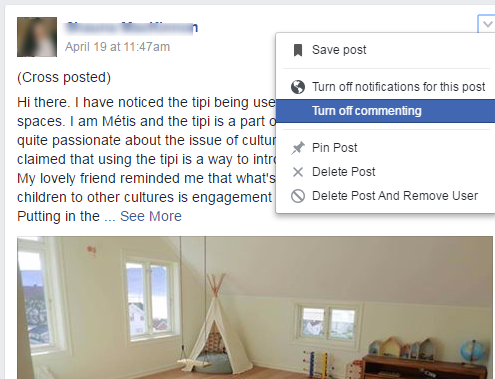
    Did you know that as a member you can turn off commenting to a post you have shared and a moderator can turn off commenting to any post? There are times you may want to do this such as when a thread becomes repetitive and/or hard to follow.  Here is how to do that and an example of what you might write.
How to turn off commenting
An example of how you might explain it in a group:


  1. Upstand
    When someone is speaking in a way that is not in alignment with the group’s purpose, attacking others, being rude or disrespectful, whether or not you are the moderator, jump in and politely try to help get the conversation on track. A conversation can go off the rails pretty quickly, but all it takes is a village (or in this case community) to help keep conversations in a positive and useful direction.  
  2. Be a role model
    Whether you’re a member or moderator in an online space, others are watching. This is especially important to keep in mind if you are an educator. How can you engage in respectful, yet critical, discourse? How do you help the conversation remain productive? How are you checking facts and citing evidence? These are all things to keep in mind when serving as a model to young students, friends, and family.  

What do you think?  Are any of these ideas helpful or ones that you’ve tried?  What’s worked? What hasn’t? What have your good and bad experiences been when sharing online?  Please share your thoughts.  

Tuesday, May 2, 2017

#NYCSchoolsTechChat: @jutecht & @mscofino Discuss #DigitalDrama

Digital drama and confrontations. Educators know it exists, but many haven’t been armed with the tools necessary to ensure their students know how to effectively address the topic with students. Sure, we teach students to pause before they post. But everyone makes mistakes. 

What then?

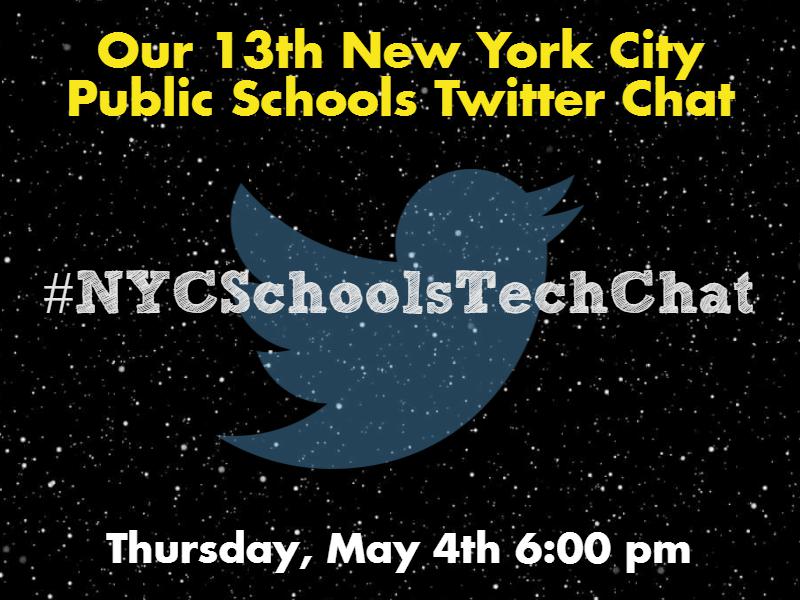
On Thursday, May 4th at 6 pm, we invite you to join the #NYCSchoolsTechChat where we will discuss #DigitalDrama and confrontation.  Our special guests are Jeff Utecht @jutecht and Kim Cofino @mscofino from @edurolearning, who will, help us discover ideas, strategies, and resources to help students think critically about digital drama and confrontations.

#NYCSchoolTech teacher Eileen Lennon moderates with me throwing in my two cents.

You can prepare for the conversation by thinking about answers to these questions:
  1. How would you define #DigitalDrama / Confrontation? #NYCSchoolsTechChat
  2. How do you prepare students to deal with #DigitalDrama / Confrontations? Ideas? Links to resources? #NYCSchoolsTechChat
  3. In which areas do you, #Ss, or #Ps struggle with #DigitalDrama / Confrontations? #NYCSchoolsTechChat
  4. How can you help support students who have made mistakes online? #NYCSchoolsTechChat #DigitalDrama
  5. How have you helped #Ss address uncomfortable norms they encounter in online platforms? #NYCSchoolsTechChat #DigitalDrama

Chat details are below:
Remember to respond using the hashtag #NYCSchoolsTechChat and include the number of the question you are answering in your response i.e. A1 and your answer.

We hope you can view the chat live, but if you are unable, please visit our archive at

Sunday, April 30, 2017

Develop Effective Commenting Skills Using Google Docs via @MsCofino

save imageInnovative educator Kim Cofino used Facebook Live to share ideas about how students could have respectful and meaningful conversations online. She explained a strategy she used to help students develop these skills within the safe and private walls of the classroom using Google Docs. This activity can help students become comfortable with effective commenting.

It goes like this.


  1. Passage in G-Docs: Put a passage from a book or article into Google docs. Set it to view only and have students read it.
  2. Comment privately: Ask students to “make a copy” of the Google doc for their own drive and comment on it privately, in a safe space.
  3. Reflect on private comments: Have students discuss their comments. What types of comments did they make? She works with students to help differentiate between critical comments and compliments. It is important for students to be able to determine the difference. She suggests making a T-Chart with each type of comment on one side or the other. You may want to bring in a post you know of to dive deeper into this and start making comment / compliment T-charts.  YouTube might be a good source.
  4. Comment sandwich: Next Cofino suggests giving students the structure of a comment sandwich to think about. This sandwiches a constructive comment between an introductory and closing compliment.  Read her post that elaborates on this technique here. Read all the way to the end where you will find you can download a lesson plan for implementing this technique.
  5. Comment publicly: With a stronger handle on commenting, students are now ready to go back to the original shared passage, but now it can be open for comments. Invite students to share their comments there.
  6. Reply to comments: Next have students reply to comments other students have written. This is an important part of commenting, that is often overlooked.
  7. Reflect on the process: What makes a good comment? A bad one? Consider working with students to come up with a rubric they can refer to when commenting.


This safe practice can lend itself well to interactions in social spaces beyond the walls of the classroom. You can start simple with the #comments4kids hashtag on Twitter. Or you can find or create a teacher blog and have students comment there. When you do, you may want to head over to check out this time-tested resource from Mrs. Yollis’ Third Grade Class. Some students may want their own blogs. If they do, commenting on blogs of peers is another useful way for students to develop their commenting muscles.