Showing posts with label break the ban. Show all posts

Wednesday, October 1, 2014

Don't Follow the Lead of @cshirky in Banning Technology

Clay Shirky author and professor of media studies at New York University, recently penned a guest article for the Washington Post sharing why he decided to ban technology in his class.  He explains how it was challenging to be more interesting than the devices. The following quote captures some of his thinking:  
“The practical effects of my decision to allow technology use in class grew worse over time. The level of distraction in my classes seemed to grow, even though it was the same professor and largely the same set of topics, taught to a group of students selected using roughly the same criteria every year. The change seemed to correlate more with the rising ubiquity and utility of the devices themselves, rather than any change in me, the students, or the rest of the classroom encounter.”
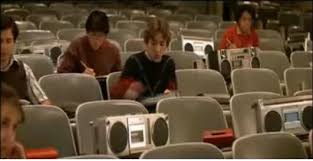
While banning might be a good idea for the “sit, listen, discuss, repeat” style of teaching, for the rest of us, not so much.  The disengaged classroom Shirky describes brings to mind the scene from the 1985 comedy “Real Genius” where eventually most every desk had a tape recorder and eventually the professor also gives in and replaces himself with a reel to reel to deliver his lecture.

Wednesday, August 22, 2012

The Innovative Educator hosts keynote student panel at 9 pm EST tonight!


What happens when students are kept prisoners of their teacher's past?

For today’s youth life outside of school is a fast-paced, connected environment where students have the freedom to learn in the spaces and with the tools they love. Once inside school walls however, digital devices and resources are often banned, collaborating is viewed as cheating, tools of engagement are seen as weapons of mass distraction, and students are prohibited from accessing the very sites and resources necessary for real-world success. 

During the Learning 2.0 Live Virtual Event I spoke to a panel of tech savvy students devoted to education reform. We discussed:

  • Problems that result when we restrict students from using technology
  • Some of the flawed logic for doing so, and
  • Solutions to overcome these obstacles  

Listen to the session here.

Tuesday, June 5, 2012

Bring Your Own Device - Questions to Consider

Guest post by - Pamela Livingston | Cross posted at 1:1 Schools

The buzz in 1-to-1 right now is about BYOD - Bring Your Own Device - and it's not a fad and it's not going away. There's a convergence of factors causing it including:
  • Hardware is diverse and at price points that are more affordable
  • Schools are hyper budget conscious
  • The "cloud" (previously called The Internet, the Web and the Information Superhighway) is ideal for core apps which are free or inexpensive with such as Google (although be sure to use GAFE), and Zoho
  • Parents are realizing that a digital device is necessary for learning
  • Schools want to be sure students possess 21st Century skills
But BYOD upsets apple carts right and left. We've been building school infrastructures for a long time that have supported a data-centric model in that IT directors allow or disallow devices on the school network according to a set model which is partly about good design and support, partly about supporting what already exists and partly about not taking on new projects or approaches that require more work, resources, and skill sets. And I've been a tech director in schools so know firsthand that opening a can of worms when it impacts the network, the laptop/desktop standardization, and the hardware replacement plan is not something many people will relish.

Thursday, April 5, 2012

Not Everyone is Jumping on the Banned Wagon

There's been quite a bit of reaction in opposition to the Chancellor's proposed social media policy that could ban teacher / student interaction using social media spaces like Facebook and Twitter.  Soon after the announcement, The Wall Street Journal picked up the story here: NYC Schools Considering Social Media Policy


More and more, citizens are coming out against those who are trying to stifle educator and student freedom of speech. The comments from parents, students, educators, and librarians in response to my reaction  (School big rips teacher Facebook ‘ban’) are well worth the read and your own comment.

Sunday, March 25, 2012

When we block social media we block learning

At New Canaan High School students have the freedom to learn using tools they love and the websites they need to be most successful. One of the two freedoms were taken away from them in honor of “Banned Websites Awareness Day.” On that day students were blocked from using the sites they commonly use for learning and collaborating such as YouTube and Facebook. Not having the ability to use the tools necessary for success in the real world for learning at school deeply interfered with their ability to get the education they deserved. It really drove home the fact that the young men and women at this school were fortunate to go to school in a place that trusts and respects young people.  

Watch this video created by librarian Michelle Luhtala to see how these young people felt when this freedom was taken from them.

Friday, March 23, 2012

Yes. Teachers & Students Should be Interacting - My New York Post Mention

If you're here because you saw my mention in the NY Post today, welcome. This is not a new topic for me. I've been talking for many years about the importance of social media in general, and Facebook in particular, when it comes to education. I have also written dozens of articles as well as been quoted and published in places like The New York Times and Tech & Learning on the topic.

If you want to run for office, run a business, or have a say in how your school is run you better be savvy in the use of social media. If you are, you not only have an opinion, you have a voice. A voice that matters and can make a difference. Unfortunately, more and more policymakers are putting restrictions on teachers and students when it comes to communicating online and in the end this hurts not only educators, but also our children.  

If you didn't see the article, it is here.
School big rips teacher Facebook ‘ban’


That article was written as a result of my comments in this article.
Less than ‘friends’ - Teachers told: Stay offline with students

If you want to read more about why I believe teachers and students interacting shouldn't result in everyone panicking, you can view what I've written about Facebook in education, by clicking here.

Tuesday, January 31, 2012

Free-Range Media = Free-Range Learning Innovation

At this year's Educon I had the opportunity to collaborate with some wonderful librarians (Michelle Luhtala, Joyce Valenza, and Shannon Miller) and a fantastic student (Michael DeMattia) to share our experiences and have a conversation about teaching and learning in a no ban and no filter zone. The conversation is important because around the nation there are schools that are making the choice to do what is most convenient rather than what is right for kids. Rather than thinking outside the ban and empowering children to use the devices they own and access the internet they encounter outside of school, students are being banned and blocked. 


During the conversation we shared ideas, experiences, and looked at questions such as the following: 
What is the difference between students in schools that filter aggressively and ban and schools that dont? What evidence do we have to demonstrate that there is a difference at all? If there is, is that difference relevant? Meaningful? Important? What do students have to say about it? Do they care?


Below is a presentation outlining what we shared.

Sunday, September 25, 2011

AASL Thinks Outside the Ban with Banned Websites Awareness Day - September 28th

Editor's Note:  This article was also posted on the American Association of School Librarian's site.  If you'd rather read it there, go here.  


Banned Websites Awareness Week image designed by Kalan Lysenko, New Canaan High School class of 2013More than a decade into the 21st century and the very tools and sites we need to ensure student success in the world are banned and blocked in many school and learning centers. Though banning and blocking is more convenient, it  is not what is right when it comes to preparing children, who will need to use and navigate these waters, for success in the 21st century. The American Association of School Librarians (AASL)  is bringing awareness to this problem by naming September 28th “Banned Websites Awareness Day.” This serves as an extension of the American Library Association’s long-standing censorship awareness campaign, Banned Books Week, beginning September 24. This new campaign directs national attention to the important conversation of the impact filtering has on our students.

Thursday, June 9, 2011

Confronting Fears and Dispelling Myths that Prevent Us From Thinking Outside the Ban

This presentation addresses myths and fears when it comes to using social media and student owned devices in school.

Sites highlighted are: 
Check it out.  Use it. Let me know what you think.


Tuesday, June 7, 2011

Do not teach this stuff to your kids

This morning I did something that would not have been possible a few years ago. My daily reading included Rafael Parente's blog which is written in Portuguese. I was able to do this courtesy of Google Translate. I was brought to his blog as a result of looking at who was coming to my blog and discovered he had linked to my article "Five Back to School Must Haves for Innovative Educators."

I found Mr. Parente was also a fan of Scott McCleod's blog and he had shared a post that he translated into Portuguese and Google Translate turned it back into English.  All of this would never have been possible if we had listened to Scott McLeod's tongue and cheek advice in the English-turned-Portuguese-turned English poem I read there.

The poem addresses a topic I write about often.  "Thinking Outside the Ban."  This excerpt includes some of my favorite stanzas.

Sunday, April 10, 2011

Is your school like a prison?

I recently shared how so many of the freedoms we have in life are "Banned in School." In this post I ask you to consider the similarities between schools and prisons and then share your results. 


What are you doing to help students find their sentence?

Two questions that can change your life from Daniel Pink on Vimeo.

Tuesday, March 8, 2011

14 Ideas to Help Educators Update and Enhance Traditional Meetings

"If your target audience isn't listening to you, it's not their fault, it's yours" Seth Godin


More than a decade into the 21st century and it’s still business as usual for many educators.  Unfortunately those charged with bringing classrooms, schools, departments, and districts beyond the 20th century are often stuck doing things the same old ways.  At a recent meeting of innovative educational leaders, staff members were told they were not allowed to use Blackberries or cell phones.  Additionally, the use of laptops was frowned upon. Handouts and materials used were not shared digitally and notes were expected to be captured on paper.  The unstated messages conveyed is that given the freedom to use technology, participants were unlikely to focus on the work at hand. The meeting organizers felt they could not be trusted to make decisions about how to best participate and do their work.  The rest of the day, like the "naughty children," we force to power down, adults could be seen sneaking their phones under tables, in the bathroom, etc. to do real work, but not wanting to be reprimanded by meeting organizers. 


Several innovative employees were frustrated. Technology is a part of the way many do business. Among other things, technology is a tool used to help them focus, collect, connect, and communicate. For some, the mandate to power down and disconnect resulted in doing the same with their attention. They powered down, disconnected and felt their expertise, professionalism, and working style were devalued.


Educators are charged with preparing our children for the future, but many are still doing things the same ol’ way.  What’s worse, they’re mandating others to remain stuck in the past with them. There are several ways that educational leaders can stop banning and start embracing technology to update how they do business with more efficient and effective results.


Here are a ideas to update face-to-face meetings followed by a description of each.
  1. Wiffiti and Twitter Enable You to Connect with Participants
  2. Paper.li and Twitter Allow You to Put Together A Professional Meeting Daily
  3. Camera Phones and Flickr Allow You  to Efficiently Capture Notes and Ideas
  4. Google Spreadsheets Allows You to Stop Wasting Time and Paper
  5. Learning Networks Enable You to Efficiently Capture, Collect, Reflect, and Respond to Ideas
  6. Texting, BBM, Crunch, etc. Promote the Sharing and Processing of Ideas
  7. Back-Channeling for Instant Feedback and Meaning Making
  8. Twitter  Allows You to Connect Globally
  9. Google Docs  and Twitter Make for Powerful Global Collaboration
  10. uStream Brings Meetings to Those Who Can’t Attend Face-2-Face
  11. iPads and Dropbox Make for an Efficient and Paperless Environment
  12. Free Wikispaces or Google Sites Provide a Digital Platform for All Meeting Materials and Resources
  13. Use Facebook to Share Links to Articles, Information, and Ideas of Interest
  14. Taking a Minute to Honor Technology

Wiffiti and Twitter Enable You to Connect with Participants

Set a Twitter hashtag for your department and/or meeting where participants can share thoughts and ideas.  Have those projected onto a Wiffiti board that participants and meeting leaders can take a look at.  This gives a terrific pulse of the members with an insight into their thoughts, ideas, and suggestions.  Using Wiffiti with Twitter is a great option because even those without a Twitter account, can send their thoughts into Wiffiti using the designated code.  

Paper.li and Twitter Allow You to Put Together A Professional Meeting Daily

High school English teacher, Cathy Stutzman, uses Twitter during large committee meeting
s and professional development training to share links to additional resources using the school or topic hashtag.  Following the meeting, in an instant using Paper.li, she and her coworkers can examine the articles and materials to inform next steps and actions. It also becomes a great resource to share with participants unable to attend the meeting.  Paper.li will make a daily newspaper following the Tweets of those a Twitter user follows, a Twitter hash tag or a list. The newspaper is delivered in a very reader-friendly format using the Twitter updates and links to bring readers stories, tweets, videos, photos and more. It is simple to create and the end result appears in under a minute and is beautiful. Here is a thumbnail of mine. Click the paper to see the actual paper. 

Camera Phones and Flickr Allow You  to Efficiently Capture Notes and Ideas

Have you ever been to one of those meetings with papers taped all around the room.  Usually, the information is handed off to someone to try to record/type or it is lost.  Why not whip out your phone and capture the picture, then email it using Flickr to instantly capture and collect those images into a slideshow that can be archived and accessed on demand.  

Google Spreadsheets Allows You to Stop Wasting Time and Paper

Another way to update the old fashioned way of doing things with flip charts is using Google docs. This is an efficient alternative  that enables all ideas to be captured and shared with one step.  Simply set up a spreadsheet.  In the left column place the questions/ideas the group is tackling.  In the top row indicate group names.  Rather than on chart paper, each group records feedback on the Google doc.  If all participants in each group have laptops, more than one can capture the input. If only one person has a laptop, that one device can be used for capture and input.  

During the share out, rather than trying to capture what is being said, simply project it.  There is no copying to do after the meeting, no compiling, no sharing.  All the ideas and information are captured and compiled right on the document.  

Learning Networks Enable You to Efficiently Capture, Collect, Reflect, and Respond to Ideas

While many schools or departments have put learning networks into place using tools like Ning, Wordpress, Group.ly or Facebook, today’s digital immigrants, might not actively participate in such environments.   Meetings are not only a great place to get the ball rolling, using learning networks also allows you to do so more efficiently while collecting the voice, inputs and thoughts of more participants.  

In advance of the meeting post some topics that you plan to have participants discuss.  While they are working in groups, have the group leader and/or group members capture thoughts and ideas in that discussion area.  Inform the group the time at which you’d like their feedback posted and then give them a chance to review the ideas from other groups.  Ask them to find at least one piece of feedback that resonated with them.  

When the team comes back together, all information is captured and participants can get to the thinking faster.  Everyone has read the ideas of all the others.  The discussion moves to making meaning of what they read and sharing the particular ideas that stood out for them.  

Texting, BBM, Crunch, etc. Promote the Sharing and Processing of Ideas

Have you ever been in a meeting when someone said something that needed clarification, you didn’t agree with, you didn’t understand, or just wanted to see how a colleague felt about this idea?  While passing notes or whispering is often considered distracting for the presenter or other participants, audience members can in essence read one-another’s minds with the use of Texting with SMS,  BlackBerry Messenger (BBM), Crunch or any such tool. Such tools allow participants to converse about topics and subtopics without interrupting the flow of the meeting.  

It also makes a meeting much more interactive.  Rather than traditional meetings where there is a sage on the stage, enabling participants to text and make meaning, gives some of the power to those in the rest of the room where they can deepen ideas and understanding.  

Back-Channeling for Instant Feedback and Meaning Making

Staff at Sidwell Friends Middle School often find it useful to engage in a backchannel conversation about the topic of the meeting using tools like Todaysmeet.com, Typewith.me, Skype, Twitter, Facebook, and Tinychat. 6th grade teacher Kimberly Clarkson explains that while some might find this distracting, others find it to be a perfect tool for keeping them engaged and focused.  Clarkson shares that different modes of processing information do not magically evaporate as one becomes an adult.  Allowing and encouraging the practice of relevant behind the scenes conversations during meetings can increase the engagement and productivity of meeting participants.

Twitter  Allows You to Connect Globally

Connect not only with the folks in the room, but with the world, during meetings with Twitter.  Have a thought, question,  idea, or simply involved in a brainstorming session and wondering what others might think?  Tweet it out.  Think of it sort of like a radio call in show where others with like interests can join in the collective intelligence.  

I’ve used this often in my work.  In fact, it is how we came up for one of the names of a citywide project my office is implementing.  Maybe an idea just doesn’t sound right, but you want to get the take of others.  Tweet out the idea followed by, “thoughts?” This quickly gives you a sense what those outside the room might be thinking.  Perhaps your discussing a topic that others are interested such as students with special needs (#spedchat), gifted and talented (#gtchat), or innovation (#innochat).  Simply use the proper twitter hashtag and see what others interested in that topic think.  While you’re there, perhaps you notice some names of leaders in the field.  Send them a direct message to inform your meeting with expert advice...FOR FREE!

Google Docs  and Twitter Make for Powerful Global Collaboration

Marry Twitter with Google docs and you have a tremendous way to not only connect and share ideas with a global audience, but you can also collaborate and create products that are beneficial to all.  This can be accomplished in a number of ways.  One way is if you’re trying to collect ideas about a particular topic you can create a Google form that feeds into a spreadsheet.  Just Tweet out the topic an url of the form and instantly your spreadsheet begins getting filled with input from a wide audience.  Perhaps you are collecting ideas for a project.  Create a G-doc with the project description and directions to contributors.  Let the collective wisdom of those inside and outside the room inform, influence, and impact your work.  

Gregory Richardson, a science teacher in New York, was thrilled when he did this.  He was working on creating a curriculum map.  He uploaded it as a Google Spreadsheet.  Next he Tweeted out the spreadsheet link with a request for help and ideas, and within seconds there was global collaboration and chat about his work.  Tweeps (Twitter people) from around the world shared ideas on his map and chatted with him.  

uStream Brings Meetings to Those Who Can’t Attend Face-2-Face

uStream is a free and easy tool that can be used to capture meetings with only a webcam, laptop, and internet.  Meeting presenters simply select “Live Broadcast” from uStream and those who can not attend face-to-face can see and hear the meeting.  They can also provide input and feedback using the chat function.  These meetings can also be recorded as a way to archive meetings or for viewing by those who need to watch what occured at a later time.  

iPads and Dropbox Make for an Efficient and Paperless Environment

At New York City Technology Coordinator Chris Casal’s school, teachers, coaches, Inquiry Team members, school leaders and others, have iPads. While they use the devices for conferring with students, grade books, etc. they also have found them to be  extremely valuable for meetings, team collaboration and “going paperless.”

iPad owners at the school use DropBox to store all folders and files that will be accessed during meetings.  For example, the school is involved in the Peer Review process which requires them to work with another school on school-wide evaluations. The process involves a number of documents. They have a  “Peer Review” DropBox folder which is shared with all the members of the Peer Review panel. Instead of printing out and sharing necessary documents, folders are set up before meetings and participants can instantly access folders and documents that have been set up for the, now paperless, meetings. The same has worked for their Inquiry Team. Among other duties, the team looks at our schools Acuity Predictive Assessments. Once the results are available the data is downloaded to a shared DropBox folder and instantly accessible to all team members at the meeting, or anytime/anywhere they need them.  

Wikispaces or Google Sites Provide a Digital Platform for Meeting Materials and Resources

We've all been at meetings where a PowerPoint and perhaps other material is shown and the presenter says something like, I'll email this out to everyone, or if you want a copy email me at...  More often than not the materials never reach the participants hands.  More importantly, having that information at the time of the meeting would enable participants to make meaning of what the presenter is saying, rather than copying it down.  At the Manhattan Office of Educational Technology, materials for all meetings and professional development are shared on the agenda via a wiki.  Taking notes are a thing of the past.  In the 21st  century we skip outdated note-taking and move right to meaning making.  Additionally, participant feedback is instantly captured and recorded.  You can see an example of what this looks like at these agendas: Innovate My class using Flip Videos and Digital Cameras or Innovate My Class with Pencasting and Screencasting.

Use Facebook to Share Links, Ideas, and Articles of Interest. 

Facebook serves as a great tool to share ideas, links, and articles that might be of interest to colleagues.  Simply take the link.  Share it on Facebook and tag both colleagues in the room as well as others who may be interested in the topic.  Rather than the outdated method of passing an article or book around the room, the link appears and everyone's wall and the result can be reach conversations and connections with those tagged as well as others interested in the topic.  

Taking a Minute to Honor Technology

At meetings at the Sidwell Friends Middle School, 6th grade teacher Kimberly Clarkson enjoys the “Tech Minute” that begins all meetings.  During “Tech Minute” time is taken to share technology tools that others can use to do their job more effectively.  These can be shared in a Google presentation like the one below,  posted separately in an appropriate discussion topic, or shared using a collaborative space like Dropbox.  


Like teachers, with their students,  it’s not enough for educational leaders to tell others to do as they say, not as they do.  Modeling and leading is the key to bringing about change for one's self, one's staff, and those with whom they work.  With all these ways technology can be used to enrich meetings today, it’s easy to see why we should stop banning and start embracing the use of technology to empower and engage learners and staff of all ages.  

Saturday, February 19, 2011

A Break the Ban Debate

Barry Bachenheimer over at the  A Plethora of Technology blog challenged me to push back on his response to my latest post about breaking the ban and giving students the freedom to learn. You might want to take a look at that post and comments first.  When I get comments like this, my hope is that they’re asked because of a genuine desire to have thinking pushed. I hope I’m right because there’s a whole lot of mind shifting that needs to happen for kids to be allowed to have the freedom to succeed in the 21st century.

To follow is Barry’s comment, with my responses embedded.  

First, let me begin by saying that in theory, I agree that we should have learner freedoms to learn as they want and schools should provide all the resources needed.

With that said, I don't think it is an simple as flipping a switch and letting kids use their cell phones, laptops, open sites, etc. any time they want to.

1. As Patrick said above, bandwidth. Not just the tech bandwidth, but the human bandwidth as well. I believe in teaching students how to use the tools in an ethical and responsible way. Do we have the staff and the training (not theoretical, but in reality) who have the skills and time to immerse this into the classroom?

Response: As one of my blog contributors Peter Kent says, “Teachers need to get over the PD excuse.” Read this for more on that. And, the reality is, kids don’t need to teachers to know how to use the tech.  The teachers need to get out the way and let kids use the tools they love to meet their learning goals.  Empower the students to own the learning and stop trying to dictate the tools they need to do it. The reality is kids not need teachers can develop policies for acceptable use when it comes to tech. Jason Suter and other teachers have had great success with this. Here’s an example.

2. I believe that part of what school is should be "coercing" kids into being exposed to things they would not choose if left to their own devices. If on their own, kids would choose ESPN, Facebook, and video games. Very few, if any would choose Shakespeare, Calculus, and Advanced Physics. Part of the mission of school is exposing them to this so they know what (or what not) to study when they get older.

Response: WTF? Really?  You think we need to coerce kids to expose them to things?  And, why must these things be crap like algebra and calculus most of us will never use or Shakespeare who many of us could care less about.  It may be important to some people, but for others it’s the reason we hated math and English.  We spend all of elementary school exposing kids to stuff.  We don’t need more of the same in a secondary education. When we overexpose kids, what we end up doing is getting students that know.  I HATE MATH. Or worse, as the movie RACE TO NOWHERE reveals, we get kids with stress, anxiety, stomach pains, or worse, they end up dropping out or even committing suicide as a result of being forced to do well in subjects that they’re just not good at or don’t care about.  

So, what if we let kids spend more time on ESPN, Facebook and video games???  Well, my cousin was a sports fanatic.  His dad had a sports memorabilia business.  He watched ESPN and the like all the time.  His parents embraced that.  He got in on the ground floor of College Sports Network which I believe was recently purchased by ESPN and he’s still there.  Say they loved social media and were on it all the time.  Maybe they’d do what Rahaf Harfoush did and intern as a social media advisor on the presidential campaign.  What if they loved video games like Aaron Iba did? His school psychology report identifies him as a multiple problem child who acts if nothing in the world matters besides video games. Google just paid Aaron 10 million bucks and gave him a full time job as a result of an online app he made.  His favorite year in school was as a fifth grade when his teacher let him sit in the back of the room with the computer all day. Everyday.  

3. They are still kids. As a parent, as much as I believe in letting my kids self-explore and have access, they are still kids and lack self control and make ill-informed or poor decisions. I don't think a lot of kids (let alone adults) have the self control NOT to be distracted by many of the tools that are "banned". I was at a PD conference recently where the teachers (adults) were not listening to the speaker and instead were playing on their phones, surfing the web, and shopping. If educated adults can't control themselves, how can we hope kids to?

Response: I know a whole lotta parents and children who’d be really pissed at a statement like that.  They’d push back and say, kids don’t have self control because school doesn’t give them an opportunity to have it.  They tell them what to learn, shuffle them from class to class, tell them when they can talk and who they can talk to.  But if we gave them more ownership over their time and their learning they’d be amazed at what kids could do.  

I had the pleasure of listening to Sandra Dodd last night who brilliantly explains just how successful her more peaceful approach to parenting can be. I asked her about how she feels about screentime for kids. Her answer went something like this:
How can controlling someone else teach them *self*-control? She has three children herself and several other parents in the room have children who they empower to make their own decisions.  They explain that the end result of not limiting screen time is that my kids learn to listen to *their own* inner guidance about how much is "too much". They are learning what *they* enjoy, not what others think they should enjoy.

This is a much talked about issue.  Recently when listening to This American Life on NPR it was interesting to hear what happened at the Brooklyn Free School when kids were empowered to determine how much screen time they should have.  Guess what? The kids figured out how to use technology respectfully and responsibly. 

This is another example that just came in to my Facebook feed from a Librarian who helped break the ban on social media in her school.  Students use Facebook freely.  Here's what they do with it when given the trust and freedom to learn.
Facebook Group  as Collaborative Research Log from michelle luhtala on Vimeo.


As far as adults not listening to a speaker at a conference, who cares?  The audience members were voting with their attention.  Maybe the speaker sucked.  Maybe s/he wasn’t engaging.  Maybe the audience just didn’t care what the speaker had to say. Maybe the speaker was great for some and not for others.  Perhaps some of them were like me listening to the speaker and capturing and Tweeting great thoughts and ideas, making connections, and later writing an article to share with a wider audience.  

When I speak I have the entire audience get out their cell phones.  My presentations are interactive.  I talk to my audience through their responses.  They have their technology out.  We think outside the ban.  They focus.  It’s great.

At my tech professional development sessions we have a no ban zone.  At many sessions we ask teachers to bring their students with them.  They have computers, phones, video cameras, smart pens etc.  They are doing fun work.  Creating, exploring developing.  When all this tech isn’t taboo and people are given freedom, you’d be amazed how the self control follows.

4. I am all for innovation. I think the tools should be available for teacher discretionary use. If they want to use FB or cell phones for a lesson or unit- great. But it shouldn't be open access, all the time. Give TEACHERS the power to control student access based on their needs and skill.

Response:  Ugh, when I hear teachers say things like “Give teachers the power to control students” it makes my skin crawl.  Why not give students the power to develop self-control.  Why not let students own the learning and use the tools they want to use.  Why make it the teachers discretion when we all know the kids are usually more likely to know the best tool to use.  Give up control, you might just be lucky enough to discover what happens when students own the learning like Keith Ferrel explains in this post.

5. Economic realities. I wish we had unlimited funds. Now with a 2% cap in NJ, hard choices need to be made. It is a hard sell to the public (who 100% fund our schools) to say that class sizes are going up and we are letting teachers go, but we are buying laptops and hiring support technicians.

Response: Don’t buy more tech.  Let students use their own tech.  For students who don’t have tech, help them figure out ways to get it.  Options are endless.  Write this sentence. "Kid needs your old technology."  Post on Craigslist.  Post on Facebook.  Post on Twitter. Post at the supermarket. Post at a fancy car dealership. A student I know just did this and got a laptop. I did this and got a computer lab DONATED. Then I got 50,000 in books DONATED. Let kids and their teachers take ownership and agency over getting what they don’t have. We need to stop always looking for others to give us what we want and need. When we allow students to use their own learning devices, you suddenly have a whole school of technicians because they have ownership over their devices in sickness and in health.  When they break, they fix it or replace it.  

6. Educating parents and community. People "know" school as they were educated. Not that it is right, b/c it isn't...but that is what they know. Look no further than the current rhetoric of what a "bad" teacher is. Most likely that impression is not based on skill or results but on how a teacher made you or your child feel. The public needs to be educated on what 21st century needs are...and businesses don’t seem to be pressuring schools to change their ways.
-Providing information for others is what this blog is all about.