Sunday, November 24, 2019

Accessibility Tip: Provide Materials Before, Not After

Woman speaking at podium to an audience in an auditorium. There is a screen behind her featuring a slide that provides the session title as well as how to access content.
The arrows point to the URL & QR code provided to participants
before, during, and after the Website Accessibility Summit.

Easy peasy accessibility tip:

Provide participants with handouts before, not after, workshops, learning opportunities, or any type of event.

What do you mean?

Have you ever been to an event where they tell you that you'll get slides and handouts after the event or in a follow-up email? This is an example of getting materials after an event. This reduces accessibility. This is because for some people, having a digital copy of the materials makes learning about and understanding the topic easier. This can apply to a variety of learning styles, disabilities, or for those not fluent in the language. 

Why not just provide the material afterward?

Some people may want to follow along during, not after, an event. They may want to access the material live. 

How does providing digital content before an event help?

Providing access to materials in advance can be helpful in obvious ways as well as ways that may never have occurred to us. Here are some of the more obvious ways having materials in advance can help.

Blind/Low vision

Those needing visual accommodations can access the materials by adjusting size, color contrast, or using a braille or screen reader.

Deaf/Hard of Hearing

Providing materials in advance of an event helps those needing hearing accommodations in a variety of ways. For example, if you have a slide show, ensure the transcript is in the presenter notes, so those who do not hear well can read what you are saying. During the presentation, turn closed captioning on your slides, to provide additional support.

Cognitive Preferences

When participants have the materials, they don’t have to worry as much about missing something. They can go back and reference it. Additionally, for some people, it is helpful to have the material that is being presented, in advance so they can interact with it in a variety of ways and focus on the learning. They may want to highlight pieces, take notes on what they are learning, file or store the information in ways that make sense to them, for later access, etc. 

Practical Considerations

An easy way to provide access to all materials is to provide a hyperdoc agenda. This means an agenda with links to all relevant materials, handouts, and presentations. Place a link to this agenda in promotional materials, emails, calendar invites, flyers, etc.

Why isn’t everybody doing this?

Some people may feel that if someone wants an accommodation such as receiving materials in advance, they should just ask for it. While this does provide access, it is not inclusive and it singles people out. 

Presenters may be hesitant to provide materials in advance because people may decide:
  • Not to attend if they have the materials in advance
  • Not to pay attention to the presenter  
  • To steal their proprietary content 

Each of these hesitations can be addressed in the following ways.
  • Attendance
    • Ensure you make clear the benefits of attending i.e. interactive activities, networking opportunities
  • Paying attention to the presenter
    • Direct participants on where their attention should be focused
  • Stealing content
    • On slides and handouts indicate the author and sharing permissions

Your turn

Now that you know providing materials in advance, doesn’t take any more effort and it provides a better experience for your participants, how might you change your practice? Do you still hold some fears about sharing content with participants or are you ready to give it a shot?

Tuesday, November 12, 2019

Wordpress, and Blackboard, and Wix. Oh My! Which School Website Platform Should You Choose?

All public schools must have accessible websites. With so many options, which platform should you choose? To help you figure that out in the alphabetical listing below you can:
    All logos mentioned in this post are displayed.
  • Visit the site
  • Check out the accessibility guidance
  • Watch a video clip from each platform as they share information about what they provided in a showcase to New York City school webmasters.
The platforms listed below are ones who demonstrated their commitment to school website accessibility by participating in the Website Accessibility Summit on November 5th in New York City.

This is the whole video and after that you can click on the link to go straight to a particular platform vendor.

Blackboard / Schoolwires

Website Accessibility Summit Showcase video for Blackboard Schoolwires
Presentation: Blackboard / Schoolwires Accessibility Showcase

eChalk

eChalk accessibility guidance
Website Accessibility Summit Showcase video for eChalk
Presentation: eChalk Showcase

Edlio

Edlio accessibility guidance
Website Accessibility Summit Showcase Video for Edlio
Presentation: Edlio Showcase

Google Sites

Google Sites accessibility guidance

Website Accessibility Showcase Video for Google Sites
Presentation: Google Showcase
Website Accessibility Summit Showcase Video for Wix
Presentation: Wix Showcase

WordPress

Make WordPress Accessible

Website Accessibility Summit Showcase Video for WordPress
Presentation: WordPress Showcase

Your turn

What do you think? Are you using a platform that supports digital accessibility?
If so, which one? What have been your successes and challenges?

Wednesday, November 6, 2019

Website Platforms Share Accessibility Support with Schools at #NYCSchoolsDigIn Summit

All government agencies must have accessible websites. This means all public schools or schools who receive federal funding must have accessible websites. The United States Department of Education's Office of Civil Rights has agreements with various school districts to help ensure institutions provide content that is accessible to everyone including people with disabilities and those who speak languages other than English.  And it’s the right thing to do! 

Pick me! Pick me!

On Tuesday, November 5th, more than 200 school webmasters and content contributors came together from across New York City schools to hear from representatives from a variety of platforms. 

They came from around the globe to be a part of the largest school district accessibility projects in the world. In attendance were the following website platforms:
  • Blackboard / Schoolwires
  • eChalk
  • Edlio
  • Google
  • Intrado / School Messenger
  • Wix
  • WordPress. com

Representatives from each company shared:

  • What each website provider offers, in terms of: 
    • their platform
    • how they would ensure all website content—pictures, documents, and text on a page—would be made accessible
    • support provided to schools 
    • costs 
  • What webmasters need to do to make content accessible
Bringing all the website platforms together in one space to speak with staff provided an effective way for schools to make an informed decision. It also enabled these platforms to learn what the other is doing and get ideas how to provide better products for schools.

What people were saying

Participants were abuzz with their learning on social media. In fact the project hashtag trended on Twitter that day. You can see some of what they were saying on social media as follows:

Your Turn

How is your school or district helping schools create accessible content on their website?

Tuesday, October 29, 2019

Face Off - Microsoft or Adobe for #Accessibility

Word & PDF logos with boxing gloves punching in between
As accessibility consciousness increases, more and more people are wondering what provider to use to make accessible content? WebAIM (Web Accessibility In Mind)* surveyed preferences of screen reader users comparing Microsoft Word and Adobe PDF. 

Creating accessible content is not only important because it is the right thing to do. It is also important because not doing so leaves institutions and businesses at risk for lawsuits and loss of funding. 

The verdict?

WebAIM research showed that respondents were much more favorable of Word documents than of PDF documents - 30.9% indicated that Word documents are very or somewhat likely to pose significant accessibility issues, compared to 75.1% for PDF documents.

Implications

Because it is a challenge to make Adobe products accessible, a institutions like Penn State, are suggesting staff avoid Adobe.

Accessible first. Not accessible search.

It’s not that Adobe can’t be made accessible. The problem is it’s not intuitive. For example, the two most important tools for reviewing and repairing PDF accessibility are the Tags pane and the Accessibility tools pane. They are both hidden by default in Acrobat. Accessibility should be the default, not the thing some people search to try to accomplish. Another problem is that several languages are not supported and there is no timeline for a fix. 

Heading navigation is key

Regardless of the platform used, the research indicates that navigating headings remains the predominant method for finding page information by those using screen readers. It also makes a page much easier and comfortable for everyone to digest. 

Up next?

Let’s put out a challenge for WebAIM to see how Google and Apple fare with feedback from respondents who use screen readers.
________________________________ 

*WebAIM (Web Accessibility In Mind) provides comprehensive web accessibility solutions and is a leading provider of web accessibility expertise internationally. WebAIM is a non-profit organization based at the Center for Persons with Disabilities at Utah State University. WebAIM's mission is to expand the potential of the web for people with disabilities by providing the knowledge, technical skills, tools, organizational leadership strategies, and vision that empower organizations to make their own content accessible to people with disabilities. 

Sunday, October 27, 2019

Digital FIRST: Your New Acronym for Accessible Content

There may be times when you think it is okay to provide a print/paper only version of content for a student. The reality as is you should do this never, ever, never, never, ever.


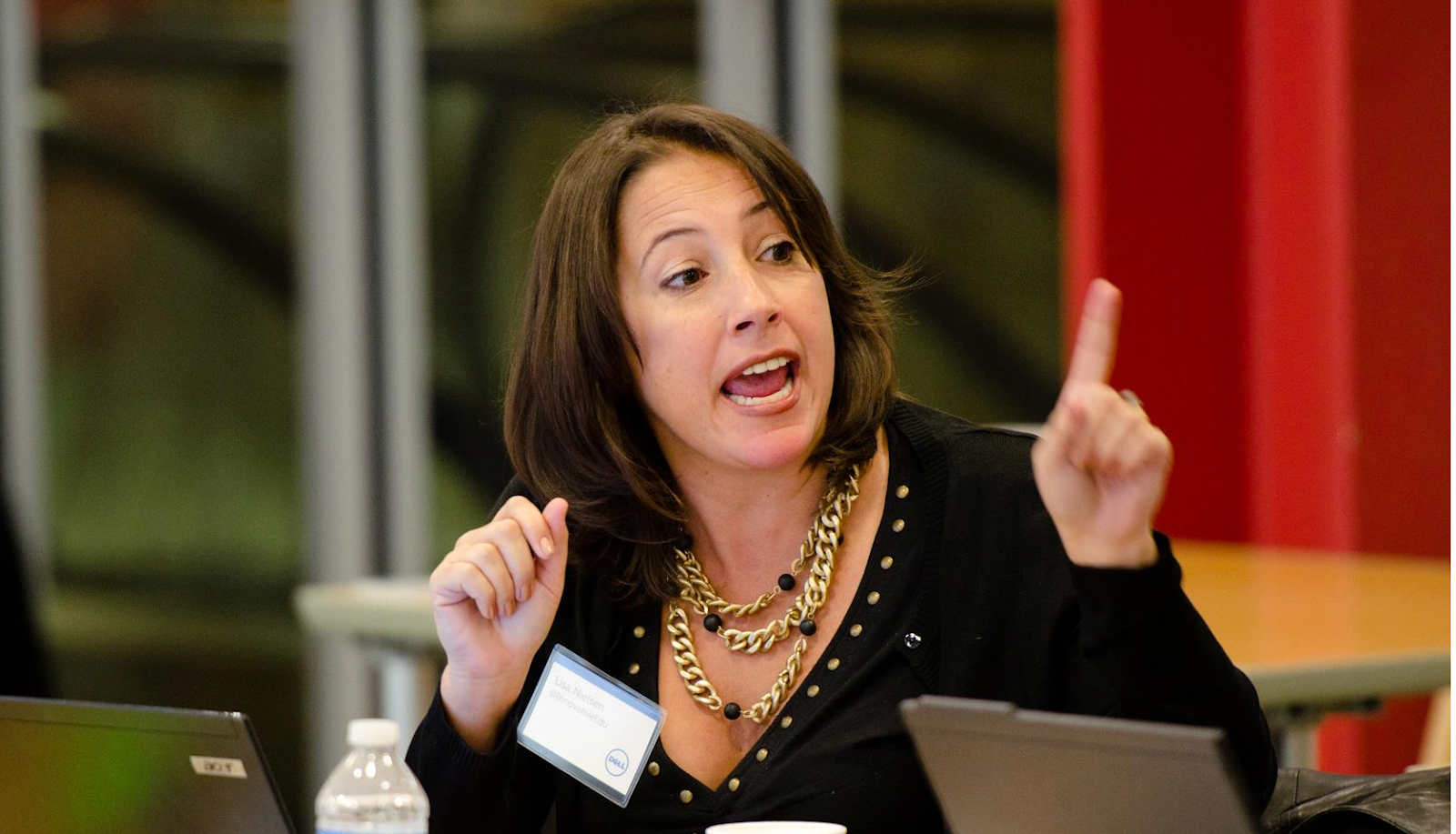
Lisa Nielsen, Senior Director of Digital Literacy and Inclusion has her  index finger raised in the air and pointing.  She is telling people that they should never, ever, never, never, ever provide paper only.
Lisa Nielsen sharing when we should use only a print version of content.
Answer: Print only should be used never, ever, ever, ever, never ever.
That's because, if you’re thinking paper first, you’re not thinking accessible first. 

If content is not digital FIRST, it is not: 
  • Find-able through CTRL+F or tabs
  • Increasable to a variety of sizes 
  • Readable by a screen reader
  • Searchable by search engines 
  • Translatable by Artificial Intelligence
Credit for creating the FIRST acronym to my digital accessibility and inclusion colleagues at the New York City Department of Education: Clay Smith and Patricia Paddock.  

Sunday, October 20, 2019

Accessibility Isn't A Nice to Have. It's A Must Have.

In her book, Haben Girma, the first deafblind student to graduate Harvard Law, explains her frustration with not being able to access the cafeteria menu at her college. Like most humans, Haben loves delicious food. Fighting for this access was part of her inspiration for later pursuing her law degree.

It's surprising that large food chain like Domino's pizza, doesn't get that everyone, including those with disabilities, want access to the food they find delicious. 
Three plates with people holding pizza in their hands

The Domino's Decision

Fortunately, the  U.S. Supreme Court understands this. Their recent decision to not hear Domino's petition on whether its website is accessible to the disabled is a win for everyone who believes in inclusivity. While Domino's, and some other retailers, consider this a loss, their view is short-sighted.
  • First, it's a terrible look from a public relations perspective to take a stand against providing access to your goods to those with disabilities. 
  • Second, it's a terrible business decision to cut off the largest minority community in the world, those with disabilities. 

Accessibility on School Websites

Retailers are not the only ones being sued for not providing accessible content. The largest school system in the nation, the New York City Department of Education has an agreement with the Office of Civil Rights to ensure all websites are accessible. More and more schools should anticipate being the focus of increased scrutiny and challenges to the accessibility of their websites. Failure to do so can have devastating consequences. These include costly lawsuits as well as possibly losing millions of dollars in federal funding. 

Fortunately, most school staff are excited to discover ways to learn how to include more of their school community into communication.

Preparing for Accessibility

To prepare and respond accordingly more and more businesses and government agencies are creating digital content with the Web Content Accessibility Guidelines in mind. This means they provide training and support to staff to ensure they understand how to do this.  

Accessibility isn't just the right thing to do, it also makes content better for everyone. Doesn't it make sense to invest time and money into making content better and available to those with disabilities rather than investing time and money into lawsuits?