Exciting news for educators and writers: Google has recently introduced a new feature called "Help Me Write" to Google Docs. Although currently available to a select audience of invited testers, it promises to revolutionize the writing process once it becomes widely accessible. Both students and professionals will benefit from having a writing assistant right at their fingertips. Schools and districts may be hesitant to adopt this technology, but embracing it is essential to prepare everyone for academic and career success in the digital age.
Seamless Integration of AI-Assisted Writing
Artificial intelligence tools, such as "Help Me Write," are becoming an integral part of our writing experience. There is no longer a need to visit separate websites to generate writing prompts or assistance; these tools are now embedded within our writing platforms for a seamless and efficient workflow.
A Sneak Peek at "Help Me Write"
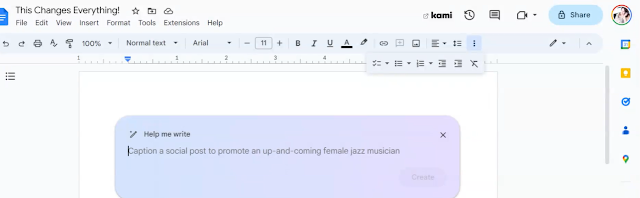
The "Help Me Write" feature offers a user-friendly interface, as illustrated in this screenshot:
To see the feature in action check out this screencast.
Rethinking Teaching Strategies in the Age of generative AI:
As educators, it's crucial to consider how these advancements will impact teaching practices. With AI-assisted writing becoming more prevalent, teachers must adapt their strategies to incorporate these tools while still fostering critical thinking and creativity in their students.
Here are a few ideas to consider:
Encourage students to use "Help Me Write" as a starting point for their drafts, while emphasizing the importance of personal voice and original ideas.
Teach students how to effectively use AI-assisted writing tools without becoming overly reliant on them.
Incorporate lessons on digital literacy and ethics to help students navigate the world of AI-enhanced writing responsibly.
The advent of AI-assisted writing features like Google's "Help Me Write" presents both opportunities and challenges for educators. By embracing these tools and adapting teaching strategies accordingly, we can empower students to harness the power of technology while nurturing their writing skills and critical thinking abilities.
I asked ChatGPT to write a lesson plan on how teachers can use ChatGPT with students. Here it is.
Objective:
Introduce teachers to the capabilities of ChatGPT and how it can be used in the classroom
Provide examples of ways to integrate ChatGPT into lesson plans
Materials:
Access to a computer or device with internet connection
OpenAI API key
ChatGPT API documentation (available on OpenAI website)
Introduction:
Begin by explaining what ChatGPT is and how it works.
ChatGPT is a large language model developed by OpenAI that can generate human-like
text based on the input it is given.
Discuss the potential uses for ChatGPT in the classroom, such as:
Writing assistance for students who struggle with language or composition
Generating creative writing prompts
Summarizing and analyzing text
Translating text into different languages
Activity 1: Writing Assistance
Have students write a short paragraph on a topic of their choice.
Use ChatGPT to assist students in editing and revising their work by providing suggestions
for grammar and sentence structure.
Have students discuss how ChatGPT's feedback helped improve their writing.
Activity 2: Creative Writing
Use ChatGPT to generate a creative writing prompt for the class.
Have students use the prompt to write a short story or poem.
Share and discuss the different stories and poems as a class.
Activity 3: Text Analysis
Have students select a passage from a book or article they are reading.
Use ChatGPT to summarize the passage and provide an analysis of the main ideas and themes.
Have students discuss how ChatGPT's analysis helped them understand the text better.
Conclusion:
Review the different activities and discuss how ChatGPT can be integrated into other
subject areas and lesson plans.
Remind teachers that ChatGPT is a powerful tool but it is not a replacement for human teachers,
it should be used as an aid for students and teachers.
ChatGPT, a language model developed by OpenAI, has the potential to revolutionize the way we teach and learn. It can provide personalized feedback and support to students, helping them to better understand and retain information. As an innovative educator, it's important to understand the capabilities and limitations of ChatGPT and how it can be effectively integrated into your teaching.
Here are some ways teachers can integrate ChatGPT into their classrooms:
Use ChatGPT as a tutor or teaching assistant:
ChatGPT can provide explanations and guidance to students as they work through problems, helping them to better understand difficult concepts. It can also be used to answer questions and provide additional resources to students, freeing up teachers to focus on other tasks.
Create personalized lesson plans:
ChatGPT can be used to generate personalized lesson plans based on a student's strengths, weaknesses, and learning style. This can help ensure that students are receiving the most effective instruction possible.
Use ChatGPT for personalized feedback:
ChatGPT has the ability to generate personalized responses to student queries. This means that students can receive individualized feedback on their work, rather than relying on one-size-fits-all explanations from a teacher.
Utilize ChatGPT for language learning:
ChatGPT can be used to provide additional support and practice for students learning a new language. It can generate personalized exercises and provide feedback on pronunciation and grammar.
While ChatGPT is a powerful tool that can not only teach students, but also enhance the educational experience, it is not a replacement for human teachers. It is best used as a supplement to traditional teaching methods and teachers are best at the personal connection and support they can provide students. By understanding its capabilities and limitations, teachers can effectively integrate ChatGPT into their classrooms and continue to provide their students with a high-quality learning and support.
Note...
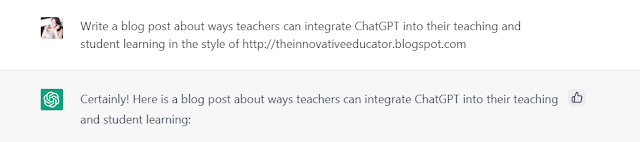
This blogpost was written by ChatGPT using the following prompt:
"Write a blog post about ways teachers can integrate ChatGPT into their teaching and student learning in the style of http://theinnovativeeducator.blogspot.com"
Any New York City teacher canregister to attendthe 10th annual #NYCSchoolsTech Summit which will be back in-person on Wednesday, August 17 at LaGuardia High School in Manhattan. At the Summit, you’ll find dozens of thought-provoking sessions, hear best instructional practices, gain ed tech insights, learn about new technologies and strategies, and network with colleagues.
There are lots of other reasons to attend the Tech Summit. Here are eight:
A chance for in-person connection
It’s been over two years since DIIT has held a large, in-person conference. This conference is a chance to reconnect with colleagues and meet SPOCs, librarians, and parent coordinators in person. In some cases, it’ll be a chance to meet colleagues in-person for the first time!
The latest tech
Emergency remote teaching turned New York City into the largest district in the nation with one device for each student. Wonder what devices and software kids are using these days? Come take a spin on the vendor floor and find out.
Keynote
This year’s keynote speaker is Roya Mahboob, an entrepreneur and Afghanistan’s first female tech CEO who has used her success and expertise to help educate and empower Afghan women and girls. She founded the Digital Citizen Fund and the Afghan Girls Robotics Team, and has worked to build innovation/tech centers across Afghanistan.
Escape room - made by students!
Can you make it out of the escape room? Give it a shot and see if you can solve a series of puzzles and decipher clues about ed tech to make it out of the room! Students at Thomas A. Edison Career & Technical Education High School designed the entire experience.
Special guest star
Gaspare Randazzo is a New York City teacher and stand-up comedian, performing in clubs around the city. He’ll be on stage, during the closing remarks, to talk about life as a teacher.
Social Media Scavenger Hunt
Is your Insta and Twitter game on point? Share what you’ve learned in the Social Media Scavenger Hunt using #NYCSchoolsTech for a chance to win terrific prizes.
Many teacher-led sessions
Teachers will host many of the summit's sessions. They’ll share their real experiences with the technology they’re using.
Free food!
We all love free food and snacks. Come to the Summit for coffee, snacks, and a delicious lunch.
Hey innovative educators. It's summertime and if we learned anything during this pandemic it's that we must prioritize self-care. That means living in a way that leads to a long, healthy life, and looking fantastic while doing it.
Background
While I've always prioritized health and fitness (belonging to several gyms and an avid beach volleyball player), pre-pandemic I found myself overweight. As schools, gyms, and volleyball courts shut down in the early days of the pandemic, I suddenly had free time and looked more deeply into not only exercise, but also diet and nutrition. I am someone who is health and cruelty conscious and I followed a mostly vegan (sometimes vegetarian) diet.
My Journey
Though I was health and fitness conscious, I was overweight. This didn’t make much sense. I bought healthy brands and was not an overeater. As the pandemic gave me free time, my research began with two books: Mark Hyman’s “Food: What the Heck Should I Eat?” and “Genius Foods.” My eyes were opened to all the ways the food industry misrepresents food for profit. After following some very simple advice, I changed my diet, and today at 53 and after going through menopause, I find myself 25 lbs (or 20%) thinner with more muscle, without counting calories and with eating delicious food. An innovative educator at heart, I want to share what I learned with any of you who are interested.
Learn How!
Here's a summary of some the ways I moved to more healthful eating.
Oils
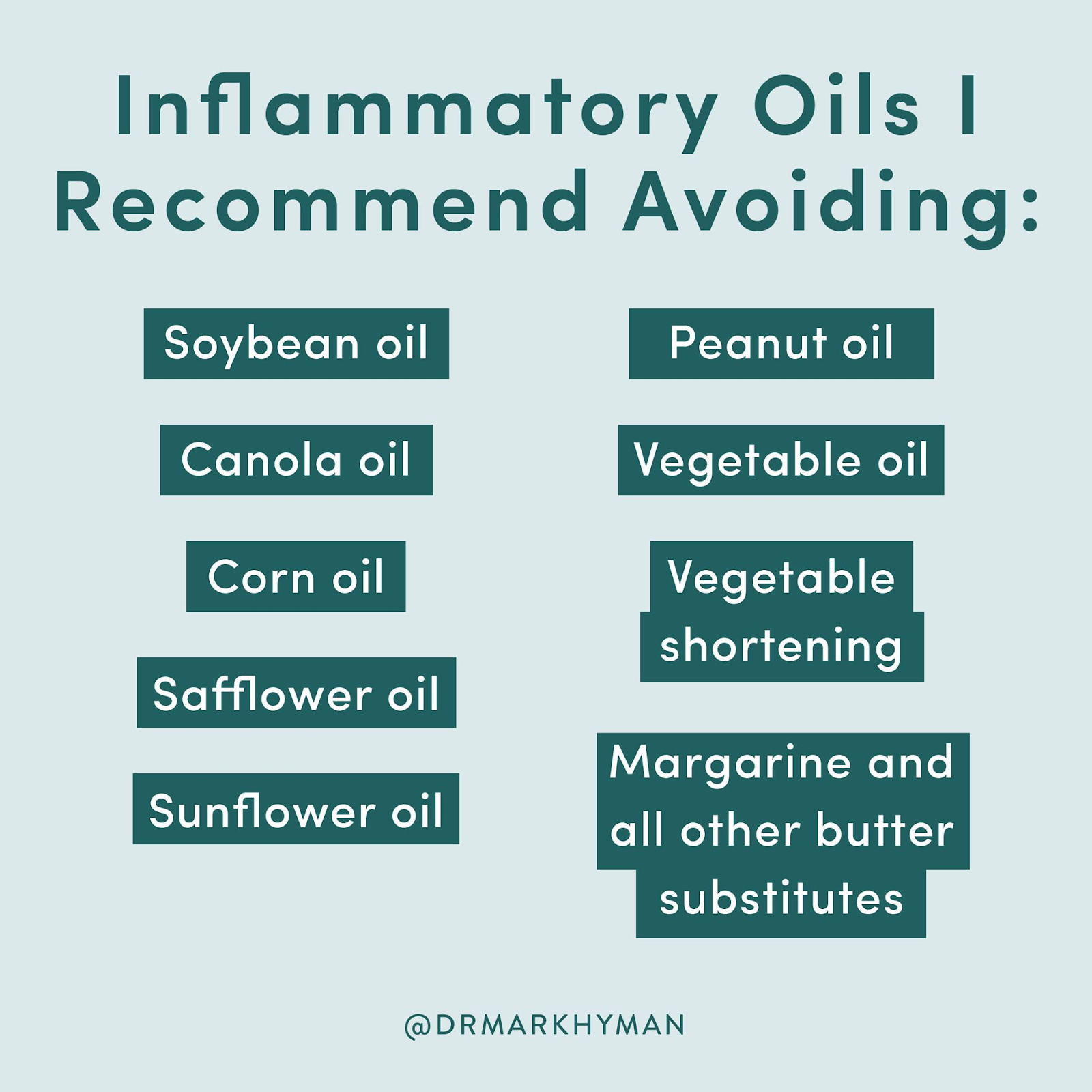
I'm starting with oils because there are oils we should use regularly and others we should avoid. Use olive oil, avocado oil, and coconut oil. Stay away from the oils in the chart below. I'm starting with oils because these inflammatory oils are often found in food marketed as vegan and they are bad for you.
Food industry marketing
Speaking of marketing, the food industry markets food as vegan, but that typically does not mean it is healthy. It just doesn't have animals. If it's packaged, it often has unhealthy ingredients, additives, and oils. Remember french fries and onion rings can be vegan / plant-based.
Meat alternatives
When Beyond Meat and Impossible Burger came out, I was beyond thrilled. I even looked into investing in the companies. What I learned later is that these highly processed meat alternatives are not healthy for us. They are generally high in saturated fat and sodium and contain those unhealthy inflammatory oils.
Packaged / Processed foods
Avoid them and eat whole foods. If they are marketed as vegan or healthy, this is a red flag that they are likely unhealthy. Want examples? When I was eating mostly vegan (with sometimes vegetarian) I found Tattooed Chef's plant-based foods. Packaged foods like this made up the majority of my diet. It was only after I learned to read the labels that I realized it was not healthy because their products contain high sodium, too much saturated fat, palm oil, and hazardous additives like disodium diphosphate, xanthan gum, and annatto.
Don't drink your calories
Most people already know not to drink soda, but that's not the only drink to avoid. Eating fruits and vegetables is much better than drinking / juicing. When you have juice you consume too many calories and lose much of the ingredients that are so good for you. If you drink alcohol, stay away from drinks where lots of sugar is added, you can always add your own monkfruit or stevia-based sweetener.
Eliminate wheats and grains
Wheat, and grains are often the staples of a traditional American breakfast. They are also "vegan," but they are terrible for us. Bread, muffins, croissants, pancakes, muffins, cereal, and even oatmeal are all a no. Instead start your day with a protein rich breakfast like eggs, avocado, mushrooms, beans, tomatoes. If you want something for a sandwich I like the Outer Aisle Cauliflower Sandwich Thins or the Egglife wraps.
While a clean vegan / plant-based diet is a great option and works for many people, I learned about the significant health benefits that can be derived from eating low-mercury, wild-caught fish that are ethically raised. While this does not 100% align to my desire to be cruelty conscious, I also learned that even eating plant-based only can displace and harm animals, so I am trying to make the wisest choices with these facts in mind. I learned that SMASH fish are high in omega 3's and low in mercury. These are small fish and the acronym includes the fish in the image below.
Yuka App
Want to see how false the advertising is instantly? Get the Yuka App which provides an amazing way to see if food is healthy. Food is rated on a score of 1 -100 with 100 being the best. Ratings are based on factors such as amount of saturated fat, hazardous additives, sodium content, calories, lactose, calories, and more. As you start using the app you'll discover foods with those healthy labels (i.e. vegan, plant-based, gluten free), often are not that healthy. There's a free version of that app allowing you to scan items, or you can pay about $15 a year and type any product in as well.
Wake Up & Read the Labels
I love Jen Smiley's work on Wake Up and Read the Labels. She breaks helps followers decipher the labels. She then breaks down why some of the healthiest marketed foods (i.e. Lean Cuisine, Weight Watchers, even pickles) are terrible for us. You can follow her on Instagram and listen to her podcast.
Stop counting calories
While restricting calories can help to lose weight, you don't need to do that. If you eat real, healthy foods, your body will be satiated and you will lose weight. I got fit by eating as much healthy and delicious food as I want. It just took some time to learn what those foods are, and they are usually not the ones the food industry markets to us as such.
Helping students learn to read is a priority in public education. However, according to the National Assessment of Educational Progress only 35% of fourth graders read at grade level. It is difficult to give students the individual attention they need to support literacy development. Fortunately, for innovative educators and their students, Microsoft has come out with some impressive tools including the brand-new Reading Coach and Reading Progress which provide accessible, individualized, and data-driven learning experiences that save time and improve learning outcomes.
These tools provide students with personalized learning experiences that will help them become fluent readers in ways that would not be possible with just one teacher with a classroom full of students.
Reading Progress
Reading Progress enables students, teachers, and parents to check reading fluency frequently and therefore differentiate more powerfully to support students on their fluency journey. Instead of feeling nervous when it’s time to do fluency checks, students feel empowered because they don't have to rely on anyone else to see their progress. They can see and build progress over time whenever they want. Educators and parents are pleased to see how well it motivates students to try multiple times and work independently to increase their scores – they are invested in their progress as readers.
Reading fluency is composed of speed, accuracy, and expression. Currently Reading Progress looks at speed and accuracy. With the forthcoming update in Spring 2022, Reading Progress will have the capacity to automatically determine the aspects of reading expression, including monotone reading, long pauses, not pausing for a period or comma, voice inflection for question marks or exclamation points, and even the stress of multi-syllable words.
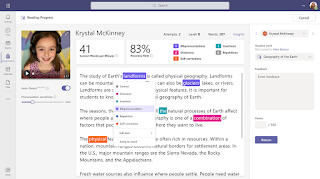
Reading Coach builds on Reading Progress by identifying the 5 words each individual student struggled with the most and presenting them again with tools to support the learner in practicing independently. Tools available to students include text to speech, syllable breaking, and picture dictionary. These supports can be enabled and customized by the educator, who sets up the Reading Coach when a Reading Progress assignment in Teams is created.
To ensure fundamentals are addressed, an Insights dashboard is being developed this Spring which will reflect students’ understanding of phonics rules. The Reading Progress software will analyze each word at the phoneme level and give an accuracy rating per phoneme. The phoneme scores are mapped onto a set of phonics rules that are surfaced to the educator to help inform instruction. Because there are many phonics rules in the English language, the rules are categorized into consonants and vowels, and then sub-categories in each area.
The phonics rules dashboards will allow an educator to see which areas need additional focus at the class or student level at a glance.
Technology tools such as these enable us to redefine and reimagine literacy development in the classroom by providing every student with learning personalized to their needs. Students empowered to use these technology tools have a much greater likelihood to achieve reading at or above grade level.