Sunday, August 22, 2010

Video Rebuttal to Educational Leaders and Parents On The Social Media Ban Wagon


As students move full speed ahead into the 21st century there are still some detours on the path to the future. Take the principal recently featured on Good Morning America who is encouraging parents to support his directive to ban students from using social media. Even though he recognizes that most students act responsibly online, he allows the bottom 2% of teens who act irresponsibly to dictate the course of action for the rest.


A 16-year-old student who goes to school in the community feels differently. In response to the video, he felt he had to comment and shared this advice.

Parents- just talk to your kids! Family bonds are important, always. If your kids will turn to you when they have trouble with things like cyberbullying and other related activity's, you can help them overcome it. Blood runs thick, keep it that way. Family members support one another, so support your kid. Parents are role models, so don’t keep them away from technology that’s here to stay, learn about it and let them use it positively.

Smart kid. If adults stopped and listened to student voices they would likely be better served. As I watched the video there were so many thoughts bouncing around in my mind, so I thought I’d try something different and create a video rebuttal in captions which turned out to be a nice way to make the proverbial yelling at the screen a shared experience balanced out with words of advice from a principal who thinks outside the ban.


Here it is.


-----------------------------
For more on this topic including 23 additional comments check out Scott McLeod's post.
Video – Response to principal who bans social media

Friday, August 20, 2010

A 21st Century Education: Documentary Film Series Profiling Education Innovators

Innovative educators will appreciate these twelve first-person films that make up a series exploring three related themes, each in its own way at the center of current debate about what works, and what's needed, to help students succeed during school and in life. I notice some familiar names of these movie makers including Alan November, Elliot Soloway and Stephen Heppell. You can visit the website here where you'll find the following films grouped by the themes below.

Side note: The images (taken from the website) aren't what I think of when I think of learning innovation. Seems to be a disconnect from the message in the films and the person assigned to graphically represent the themes.

Technology and 21st Century Learning

These films look specifically at the ways that the latest digital and mobile technologies can potentially transform the ways that young people communicate, collaborate, and learn.

Films

Student-Centered Learning

These films look specifically at ways in which school leaders and educators are testing and proving project-based models for a new, student-centered model of learning.

Films

Social Equity and Justice in Education

Dismissing suggestions that poor kids can't learn, these films demonstrate how much is possible when people come together to challenge the conventional wisdom about urban public education.

Films

Last Day of Free Ning Networks - What Should You Choose?

Today is the last day of free Ning Networks. To date I’ve mostly considered other hosted options to replace Ning, however, recently I was challenged as to why I prefer a hosted platform vs self-hosted. The answer is simple. Because they’re free and easy. Of course on the other side of the issue is any platform that is free today can be gone tomorrow or charge tomorrow. Network creators affected by the Ning disaster know this first hand.

However, like a breakup with a significant other, I don’t see all other service providers through scorned eyes. I’d like to believe there are other companies like Wikispaces and Google Apps for Ed who really do believe in free for educators...and not faux free like Ning i.e. you can get for free something that isn’t really enough for most of you, but we’ll look good and so will Pearson. So I wrote this post The Innovative Educator’s Learning Network (Alternatives to Ning) Top Picks where I suggest my top picks which are hosted and this post Death of Freemiums at Ning Could Mean Better Opportunities for Schools where I also explore the Children's Online Privacy Protection Act of 1998 (COPPA) and suggest some ways we can use learning networks with pre-teens.

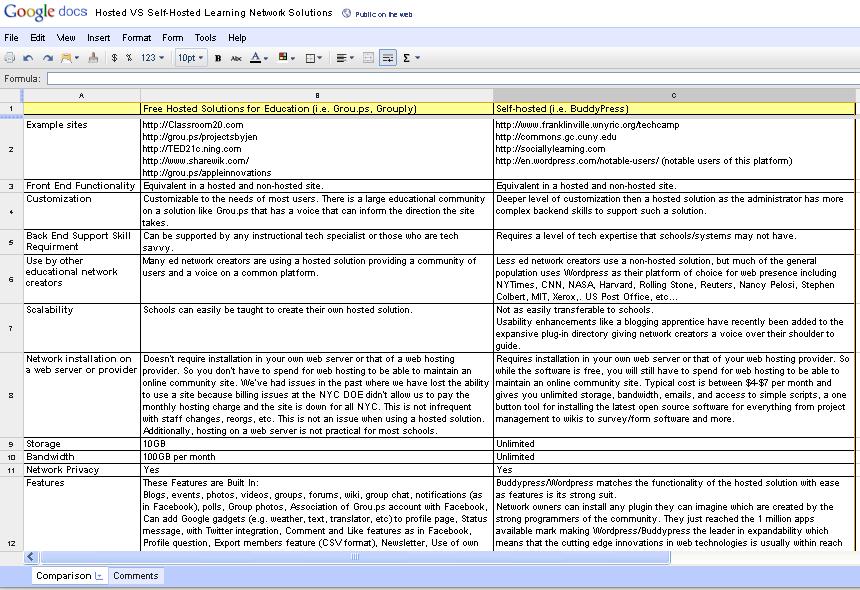
For most network creators, I’m still love struck enough with the “free for educators” idea and believe that we can trust sites like Grou.ps, especially when enough educators hop on board, but clearly if they go the way of Ning, I’d readjust my thinking. The other issue is the superior level of customization and integration that is available with self-hosted platforms. The downside of this is that to realize the benefits you need to 1) have a higher level of techspertise then many of us (including me have) and 2) It requires installation in your own web server or that of your web hosting provider. So while the software is free, you will still have to spend for web hosting to be able to maintain an online community site. Typical cost is between $4-$7 per month and gives you unlimited storage, bandwidth, emails, and access to simple scripts, a one button tool for installing the latest open source software for everything from project management to wikis to survey/form software and more.

So, while I’ve dug my heals into the ground picking free and easy, I realized it was time to look more closely at the self-hosted solution, but where to start? I have no experience with a self-hosted solution so I asked the brilliant and knowledge members of my personal learning network to contribute their input in a Google doc as I recently shared in my post The PLN Matures. The Progression of the 21st Century Personal Learning Network.

Here is the result which you can see live (and even contribute to) by clicking on the chart below.


Special thanks to @funnymonkey, @don_watkins, Evan O’Donnell, Jim McDermott and all the others who you can see in the revision history of the comparison document. You can read a more detailed analysis of which solution to select over at The Techomnivore in his piece, “For your educational network, personal learnin network, or special interest social network, you’re missing an opportunity if you leap from ning to another hosted service before fully considering Buddypress.”

Thursday, August 19, 2010

6 Ways to Use Cell Phones to Strengthen the Home-School Connection

Step three in the 5 Steps to Harness the Power of Cells in Education is strengthening the home school connection. Once parents/families experience ways cell phones can be used as a learning and connection tool they will become empowered and more open to using the devices as learning tools with their students.

Here are six free and easy ways to get started.

Google SMS - Translate
Teachers and families can use Google SMS Translate to send text messages to one another if they speak different languages.
How: Text 466453 with the words Translate and your message to (recipients language) i.e. Translate How are you? in French. Google SMS will reply with: Translation: 'how are you' in English means 'como estas' in Spanish. The teacher can text the translated message to the student’s parents and vice versa.
URL: http://www.google.com/mobile/products/sms.html

Drop.io - Free Voicemail Box
Set up a Drop.io account where parents can leave you voice mail anytime without interrupting your lesson.
How: Drop.io assigns a voicemail number to the creator's account. The teacher simply shares this number with her student’s parents. They can leave a message anytime. Drop.io makes it easy to name and comment on any audio recording making it easier to remember any important information about the caller such as noting if you’ve returned your call, any important documents you want to have on hand, and/or serving as a reminder to what you discussed.
URL: http://drop.io

Send group texts for notifications
Set up group texting in a service like Swaggle or WeTxt to notify parents about important events, question of the day, celebrations, exciting accomplishments, cool projects, assignment due dates, etc. If you have a multii-lingual student body you may want to group parents by language.
How: Go to the website and enter your phone number where you will receive a password texted to your phone. You can create groups as appropriate for your students parents. You will be asked what you want your name to be. Set this to the name the students/parents know you by or if that is taken consider adding your school mascot i.e. MsNielsenTigers. Next you invite parents to join either by entering their numbers in your phone or on the website.
URL: http://www.wetxt.com or http://www.swaggle.mobi

Poll Your Parents
If knowing what your parents are thinking is important to you, Polleverywhere is a great tool. It enables you to let parents have a say and show them their thoughts and opinions matter. You can poll them or request open response using Polleverywhere.
How: To use poll everywhere the teacher sets up an account at which they’ll be assigned a number for participants to send their answers. Within the message respondent enters the code corresponding to their response. This looks similar to what you see on popular shows such as American Idol. Without any additional equipment or need to download software within seconds educators will have parent responses. Another nice feature is that it doesn't matter what device your parents are using as text message, web, and smartphone responses can be instantly combined.
URL: www.polleverywhere.com

Use Wiffiti for Parent Feedback
Ask your parents questions, thoughts, opinions, and have them text answers to Wiffiti. Maybe you want to know what your parents are expert in and would like to share with your class. Perhaps you want to know your student’s birthdays. Have your parents send in the student name and birthday to a Wiffiti board.
How: Send a group text to parents asking them to share and text to Wiffiti. Everyone will know everyone well very soon.
URL: http://wiffiti.com

Twitter for Live Class Updates on Your Website, Blog or Wiki
Description: Twitter is a great tool that allows you or your students to instantly make the home-school connection by updating your class website, blog, or wiki. Simply tweet important or interesting events happening in your class and have it feed into your selected online space. Parents and families have an ongoing window into your classroom. Educators may want to Tweet information themselves or allow students to use their cell phone to Tweet items of interest when they arise.
How: Once you have a Twitter account set up you’ll visit http://twitter.com/devices and enter your phone number so you can update Twitter from your phone. You will then go to your desired online space (website, learning network, blog, wiki, etc.) and paste in the Twitter feed embed code. You can select the widget you’d like to use here.
URL: www.twitter.com

Once parents are comfortable using cell phones as an extension of the classroom you may be ready to move on to the next step. Enlisting parents to partner with students on homework involving the use of cell phones.

Wednesday, August 18, 2010

5 Readings and 2 Videos to Help Others Get Going with Personal Learning Networks

I refer to my wonderful personal learning network a lot in this blog. Here are some of my posts on the topic.
Personal learning networks, or PLNs for short, are a relatively new concept. In fact when I first wrote about PLNs in 2008 I searched the term on wikipedia and came up short. So, I decided to start my own wikipedia entry which was rejected saying something to the effect of me not having the right or authority to just make up terms. In writing this post I notice the term finally did get accepted just this year and though rather scant you can read about PLNs here.

I first heard about PLNs from Will Richardson and shared his video about the concept in my post 5 Things You Can Do to Begin Developing Your Personal Learning Network. Here is Will’s video.


Today, I discovered a creative new video about PLNs from a talented artist through this Tweet.

mbteach RT @nashworld: And yet another look at PLN by @johntspencer => http://is.gd/enpkm simple and grounded. Like this. Will share.


The video provides a short engaging overview of what a PLN is. Aside from the exquisite artistic ability of it’s creator, something I really like about this video is that @johntspencer includes face-to-face interaction in his definition of PLNs. To me this is significant as I think many mistakenly think of a PLN as just your followers on Twitter or Friends on Facebook living in virtual worlds. While this is extremely powerful and leads to tremendous global connections, to me PLNs can be made up of people you connect with in a variety of ways. Some may never even know they’re a part of your PLN but you follow their blog or books religiously. Sometimes (and hopefully) your colleagues make up your PLN. Many of us innovative educators are finding more and more often that in many cases we meet someones mind before their face. This makes both the face-to-face and virtual connections even more powerful. You skip past the “getting to know you” and right into deep conversation ready to pick up just where you left off whether the past or future conversation happened as a DM on Twitter, a comment to a status update on Facebook, a backchannel chat during a webinar, IMs during a con call, or over cocktails.

The PLN Matures. The Progression of the 21st Century Personal Learning Network

I’ve noticed an exciting new trend lately with personal learning networks (PLNs).
To date the progression of the PLN has gone something like this.

1) Joining
People organically develop their PLNs when chosing to participate in social media like Twitter, Facebook , blogs, and through learning networks like Classroom 2.0.

2) Lurking
Once a member of an online community, people generally watch to get a feel for how things work and consume information.

3) Conversing
Next people move to joining conversation by retweeting, replying to discussion, commenting on blogs, connecting face-to-face building on ongoing conversations, etc.

4) Initiating/Creating
Sometimes people move to initiating the conversation by tweeting, starting discussions, launching blogs or learning networks, starting conferences (i.e. Educon, EdCamp) etc.


What I’ve noticed lately, is that this has moved a step further from, wait for it...

Conversation to Collaborative Creation
The natural progression of PLNs where people move from consumption to creation seems to be moving to the next level: Collaborative Creation.

I first noticed this when Mary Beth Hertz and Kevin Jarret shared with me during preparation for our #140Conference panel how they used the power of their PLNs to collaborate to create what is now called EdCamp. EdCamp is a day-long, completely free, user-driven “unconference several educators spent several months planning, mostly virtually resulting in a terrific learning experience for all those who participated and leading to future EdCamps. Drawing from a PLN to collectively share and put together an unconference is extremely powerful and likely couldn’t easily be done without many Web 2.0 technologies available today.

Hey PLN, Can Ya Help Me with This?
Then I noticed something else happening in the Twitosphere. People were tweeting out requests for others from their PLNs to help collaborate on projects. The requests were not just asking for feedback, comments, or responses, but to actually jump into collaborative documents and join in the creation of materials connected to areas of expertise. The result in many cases would be something that benefited and informed all collaborators. What’s more places like Twitter and Facebook make it easy to reach out to/tag specific people if you want to virtually tap an expert on the shoulder for input.

I was so intrigued by this that I asked a few people doing this to share guest posts on my blog to share what they were doing. The work they were doing was nothing short of transformational.
These educators were collaborating to come up with smart ways to update their curriculum by infusing innovative, collaborative ideas. Teachers all contributed to a document what unit of study they were focusing on, ideas for innovating instruction, challenges, and questions. There was an additional column for suggestions. The document was tweeted out by some class members and next thing you know there was a global conversation with people providing feedback to teachers as they were learning directly in the document in which they were working.

Here are the two posts explaining exactly what took place.
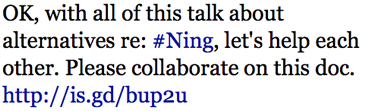
Perhaps the most amazing example of this was when Alec Couros Tweeted:


Wow! What resulted was a document that you could see had dozens of contributors sharing, creating, developing a document that is currently 24 pages and counting and the source for numerous articles about Ning Alternatives. Sylvia Curry made a screencast of the “Ning Alternatives” document being edited in the first few minutes. The process was incredible and you can see pieces of it below with exactly who is editing where. What you can’t see is the top right part of the screen where Google docs shows you who is collaborating and also allows for a chat that can take place about the document.


Next I noticed a revered educator, Lucy Gray doing something similar. She Tweeted:
elemenous Share any thoughts/resources for meeting the needs of adult learners here. http://tinyurl.com/23bytyb #appsct 1:51 PM Aug 12th via TweetDeck Retweeted by you

So, I took a look at her Adult Learners document. What I saw was people (including me) collaborating from around the world on a Google doc with Lucy conducting a conversation in the instant message feature of Google docs prompting folks to think deeper and provide additional insights and information. This is a document that is useful to all those reading and contributing.

Being the innovative educator I am I had to jump on the bandwagon, so I followed the lead of Lucy, Alec, and the rest and I tweeted this:
Contribute to hosted v self hosted Ning alternatives http://tinyurl.com/selfhostedvhosted Focus - Right language rather than critique.

I also sent direct replies to some people I knew were successfully learning network hosts such as these:
@stevehargadon Wld luv ur contribution @ hosted v self hosted Ning alternatives http://tinyurl.com/selfhostedvhosted
@jenwagner - Not sure I understand the question. It's really "any" hosted v self hosted solution.

I also had extended conversations with @funnymonkey and @don_watkins who contributed generously. The result was this document that compares hosted vs self-hosted alternatives to ning (stay-tuned for upcoming post).

As creator of my own learning network I had expertise in the hosted solution, but I did not have expertise in the self-hosted solution. What better way to learn, make meaning, and create then with contributions from my PLN.

I know the phrase “game changer” is overused these days, but...I think this qualifies. Do you?